Overview
Ghost Network Mapper is a lightweight network reconnaissance tool that discovers devices connected to a local Wi-Fi network, identifies open ports, and highlights services that may be exposed externally.
The tool combines Python, Nmap, and a web-based visual interface to transform traditional command-line scan output into a simple and interactive dashboard. Instead of manually parsing Nmap results, users can view devices, ports, and exposure risks through a clear visual network map and structured device table.
This project was built to better understand how attackers enumerate networks and how defenders can quickly identify potential attack surfaces within their own infrastructure.
Objectives
The goal of this project was to:
• Discover active devices on a local network
• Identify open ports running on each host
• Detect potentially exposed services
• Present results through an interactive web interface
• Gain practical experience integrating network scanning tools into Python applications
How it Works
Network Discovery
The tool uses Nmap ARP scanning to identify active hosts within a local subnet. ARP scanning is particularly effective on local networks because it operates at the link layer and can detect devices even when ICMP responses are disabled. Each discovered device is then processed for additional enumeration.
Host Identification
Once a device is discovered, the application attempts to resolve its hostname using local DNS or reverse lookup techniques. If a hostname cannot be determined, the tool labels the device as unknown. This helps provide better visibility into what each device may represent on the network.
Port Scanning
For every discovered host, the tool performs a scan of the top commonly used ports using Nmap.
This helps identify services running on the device such as:
• HTTP / HTTPS
• SSH • Remote access services
• IoT device services
• Media streaming ports
Understanding which services are active helps determine potential entry points attackers could target.
Web Interface
To make the data easier to interpret, the project includes a Flask-based web interface. The interface provides two main views.
Network Visualisation
A graphical network map displays the router at the centre with connected devices branching outward. Each device appears as a node representing a detected host.
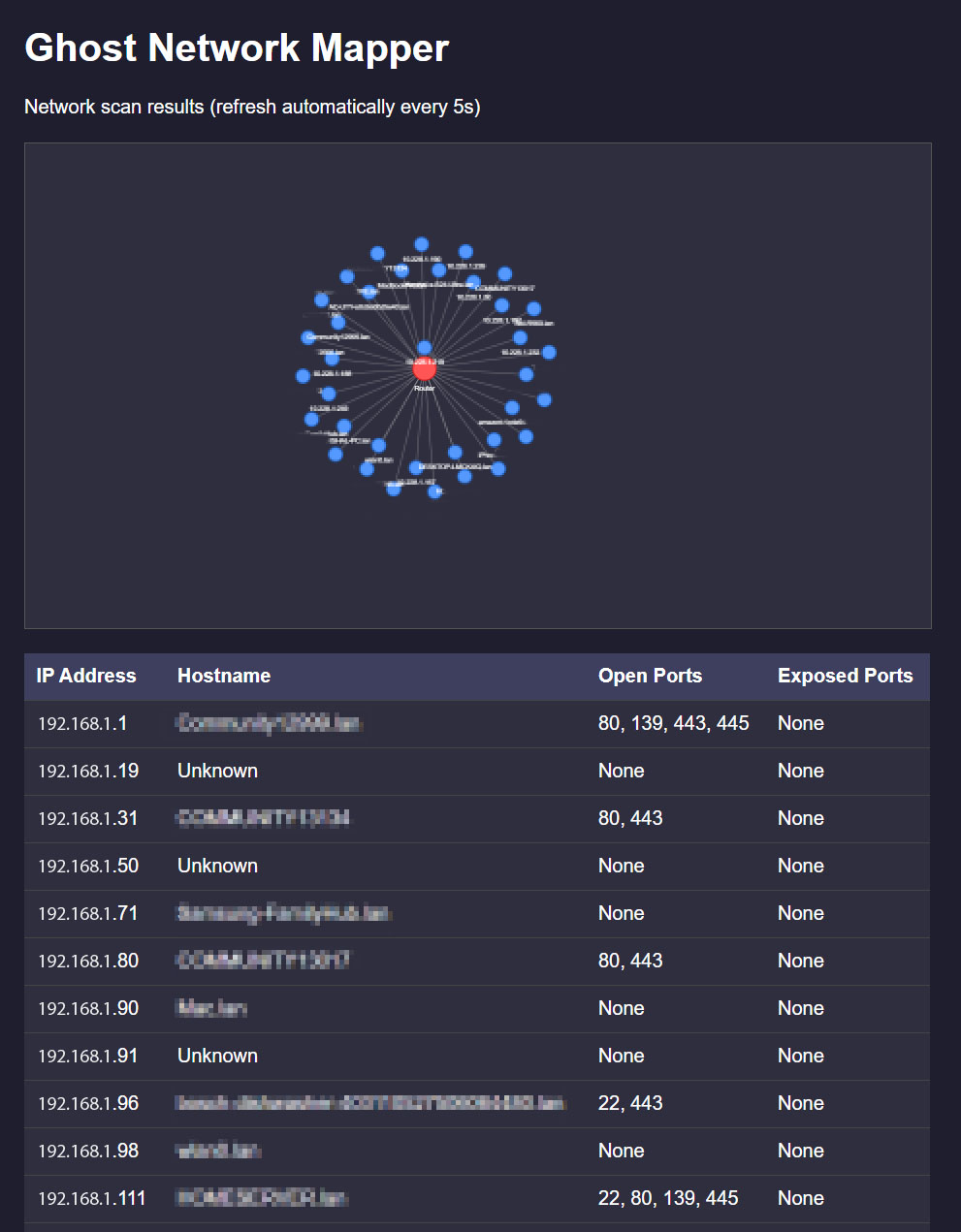
This visual representation makes it easier to quickly understand the structure of the network.
Device Table
Below the visualisation is a structured table showing:
• IP address
• Hostname
• Open ports
• Exposed ports
This format allows users to quickly review network activity and identify devices running potentially risky services.
Environment Setup
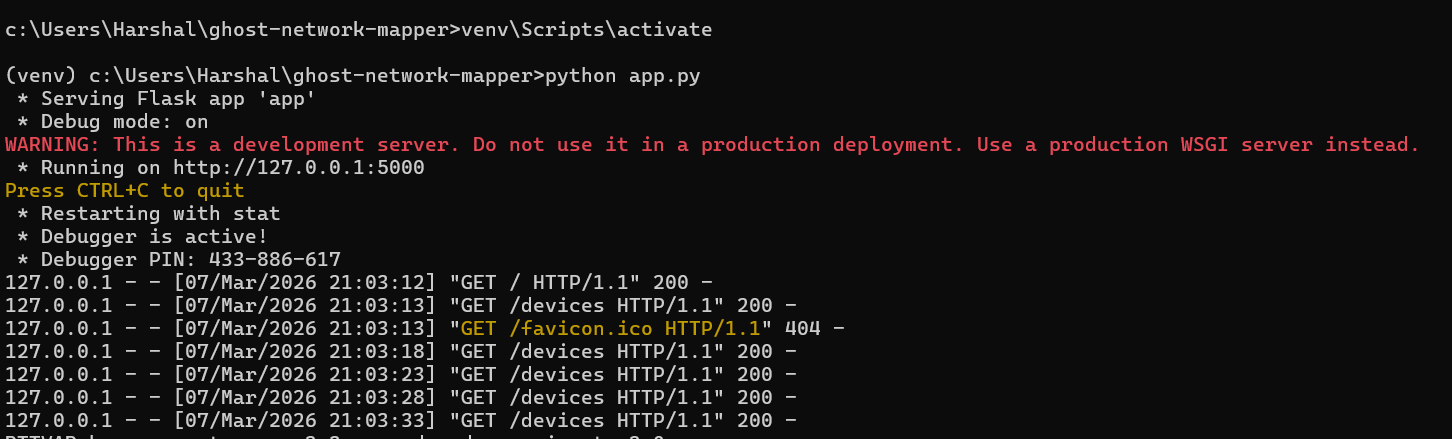
Setup
A) Open the project folder - cd path/to/Ghost-Network-Mapper
B) Activate your virtual environment - Venv\Scripts\activate
C) Start the application - python app.py
Tools
Technologies Used
• Python – application logic and automation
• Flask – lightweight web server and dashboard
• Nmap – network scanning and port enumeration
• JavaScript (Vis.js) – network visualisation
• HTML / CSS – user interface
Skills Demonstrated
This project demonstrates practical skills relevant to cybersecurity and network analysis, including:
• Network enumeration and host discovery
• Port scanning and service identification
• Integrating external security tools into Python workflows
• Building simple security dashboards
• Understanding network exposure and attack surfaces
Ethical Use
This tool is intended for educational and defensive security purposes only. It should only be used on networks that you own or have explicit permission to analyse.
Future Improvements
Potential enhancements for the project include:
• Automatic subnet detection
• Device fingerprinting and operating system identification
• Exporting scan results
• Real-time scanning updates
• Service version detection for vulnerability analysis
Conclusion
Ghost Network Mapper was built to explore how devices on a local network can be discovered and visualised in a simple, interactive way. By combining Python-based network scanning with a lightweight web interface, the project demonstrates how raw scan data can be transformed into a clear visual representation of connected devices.
The tool highlights how concepts such as device discovery, port scanning, and network topology mapping can be integrated into a single application. It also shows how backend scripts and frontend visualisation can work together to present real-time information in a more intuitive format.
Overall, the project provided practical experience with Python, network scanning techniques, and building a small web-based interface for security and monitoring purposes. It also reinforced the importance of handling network information responsibly and ensuring sensitive details are not exposed when sharing or demonstrating security-related tools.
Download Project
You can access this project and try it out yourself but remember to insert your IP address in the scanner.py file as mentioned.